How can I track my school's website usage?

Schools-Online offers you the most insightful website statistics. It is easy to use and understand with no training or prior experience. Everything you need to know about your website traffic is on one page.
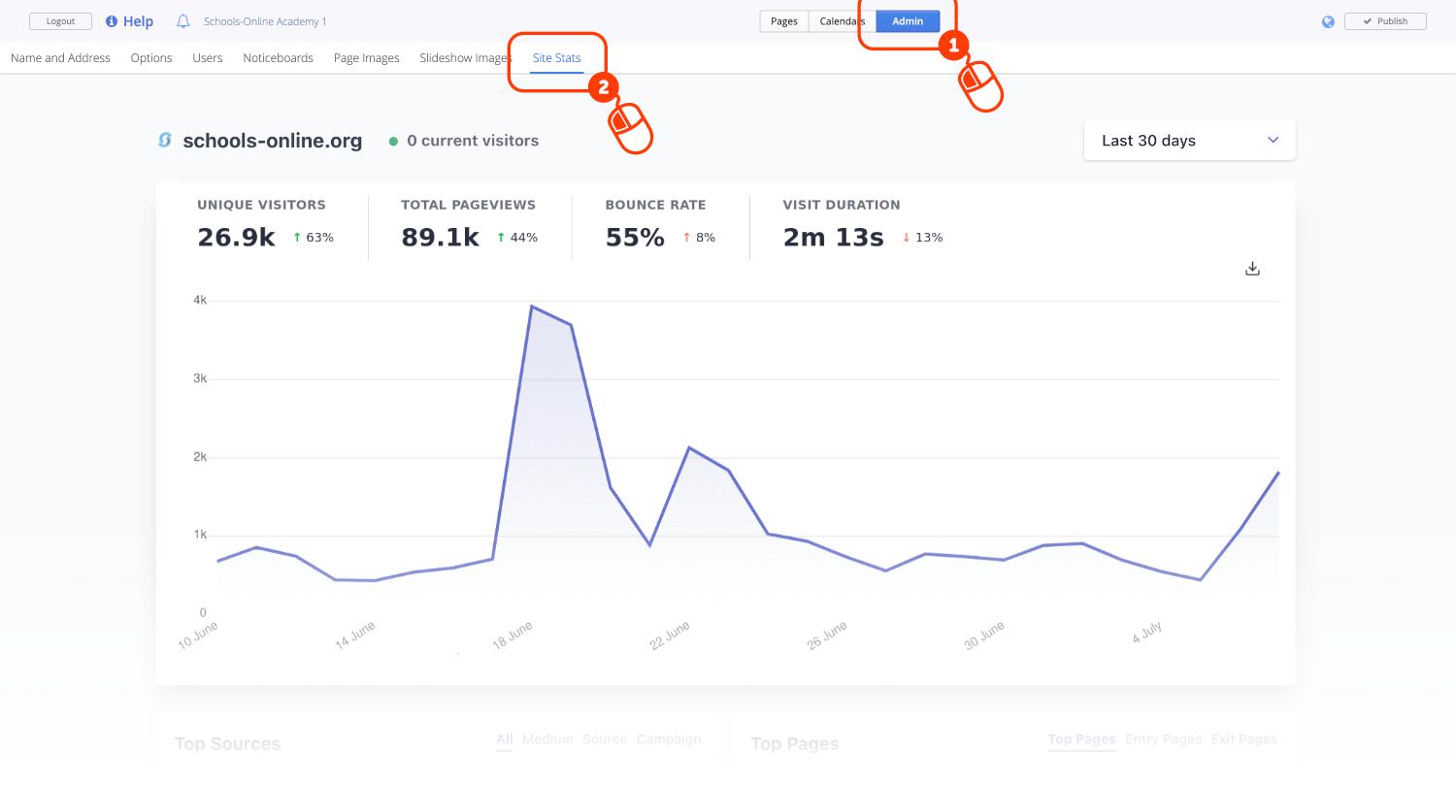
Simply click Admin at the top of the editor and look for the new Site Stats Tab.
What data does it measure?
Our analytics track overall trends in your website traffic. It does not track individual visitors. We don’t use cookies, we don’t generate any persistent identifiers and we don’t collect or store any personal or identifiable data. All of the data that we do collect is aggregated data only and it has no personal information.
Website measurement is carried out absolutely anonymously. We measure only the most essential data points and nothing else. Here is the complete list of what we collect and store about your website visitors
| DATA POINT | Example | Comment |
| Page URL | https://yoursite.com/homepage | We track the page URL of each page view on your website. We use this to show you which pages have been viewed and how many times a particular page has been viewed. |
| HTTP Referer | https://facebook.com | We use the referrer string to show you the number of visitors referred to your website from links on other sites. |
| Browser | Chrome 86.0 | We use this to show you what browsers and browser version numbers people use when visiting your website. This is derived from the User-Agent HTTP header. The full User-Agent is discarded. |
| Operating system | macOS 10.15 | We use this to show you what operating systems people use when visiting your website. We show the brand of the operating system and the version number. This is derived from the User-Agent HTTP header. The full User-Agent is discarded. |
| Device type | Desktop | We use this to show you what devices people use when visiting your website. This is derived from window.innerWidth. The actual width of the browser in pixels is discarded. |
| Visitor Country | United Kingdom | We look up the visitor’s country using their IP address. We do not track anything more granular than the country of origin and the IP address of the visitor is discarded. We never store IP addresses in our database or logs. |
How do we count unique users without cookies?
We generate a daily changing identifier using the visitor’s IP address and User Agent. To anonymize these datapoints, we run them through a function, which generates a random string of letters and numbers that is used to calculate unique visitor numbers for the day.
Using IP addresses to count visitors is remarkably accurate when compared to using a cookie. In some cases it might even be more accurate than using a cookie because some visitors block cookies altogether.
Where is the data hosted?
All of the data that we track and collect is kept fully secured, encrypted and hosted on renewable energy powered servers in Germany. This ensures that all of the website data is being covered by the European Union’s strict laws on data privacy. Your website data never leaves the EU.
Who owns the data?
You remain completely in control of your site data and you fully own all of your data too. We do not obtain any rights from you to your website data.
We will never sell or share your site data to any third-parties.
- Your website data is not shared with advertising companies or any other companies in general.
- Your website data is not sent to any third-parties at all.
- Your website data is not mined and harvested for personal and behavioural trends.
- Your website data is not monetized.
Are the web analytics GDPR, CCPA and PECR compliant?
You don’t need to have any GDPR, CCPA or PECR prompts and you don’t need a complex privacy policy about your use of analytics and cookies. With our analytics, you are not tracking any personal data. Your visitors can enjoy your site without any annoyances and distractions.
How do I view the reports?
- Choose the time range that you want to analyse. The visitor numbers are automatically presented on an hourly, daily or monthly graph. The default time frame is set at the last 30 days.
- See the number of unique visitors, total page views, the bounce rate and visit duration. These metrics include a percentage comparison to the previous time period so you understand if the trends are going up or down.
- Right below that you see all the top referral sources of traffic and all the most visited pages on your site. Bounce rates of the individual referrals and pages are included too.
- Underneath the referral sources and the most visited pages, you see the list of countries your traffic is coming from. You can also see the device, browser and operating system your visitors are using.